
It’s no secret that links are still one of the most important ranking factors for Google.
In fact, with over 200 different factors Google considers, it’s up there in the top 3.

Source: https://userp.io/link-building-statistics/
So it’s really simple. To rank your website higher, building high-quality links using white hat strategies needs to be part of your SEO strategy.
This can be a difficult task, and there are a lot of link-building tools on the market today. But only a few of them are worth your time and money.
I’ll be sharing my top seven picks for the best link-building tools you need in 2022. And trust me, these are all essential!
By the end of this article, you’ll know link building software to:
Find link building opportunities;
- Run a backlink analysis;
- Find and contact info for prospects;
- And manage your outreach campaign
Let’s dive in.
What are the best link building tools?
The best link building tools are:
- Ahrefs
- Hunter.io
- Seamless.AI
- Check My Links
- Buzzstream
- Haro
- Linkody
| Tool | $ (starts from) | Find Backlink Opportunities? | Find Contact Info? | Manage outreach campaign? |
|---|---|---|---|---|
| Ahrefs | $99 | Analyze competitors’ backlink profile | ❌ | ❌ |
| Hunter.io | $49 | ❌ | Finds emails | Launch and track email campaigns |
| Seamless.ai | $99 | ❌ | Finds emails, contacts and LinkedIn profiles | ❌ |
| CheckMyLinks | Free | Discover broken links | ❌ | ❌ |
| HARO | Free | Connect with reporters | ❌ | ❌ |
| Buzzstream | $24 | Find possible influencers | Find emails | ✅ |
| Linkody | $14.90 | See competitor’s backlinks | ❌ | Tracks your backlink profile |
Most businesses use these tools to build links, and I’ll show you why.
1. Ahrefs for competitor and backlink analysis

Ahrefs has many tools to help your SEO strategy and link-building process.
One of them is the Backlink Checker, which allows you to explore a site’s backlink profile from an index of up to 395.5 billion pages. This extensive index is more than any other tool can offer.
When using this tool, first find the keywords you want to rank for. For example, let’s say you want to rank for the keyword “artificial intelligence statistics.”
First, head into the Keywords Explorer, and put in your keyword:

Your competitors will appear on the Search Engine Results Page (SERP).

Alternatively, you will get the same results with a google search.
However, to analyze your competitors’ backlink profiles, you’ll need to copy the top competitor’s website to analyze their backlink profile. Like this:
For the paid tool:


Or through the free tool here: Ahrefs Backlink Checker.

On the free version, you can see the competitor’s link profile, including:
- URL Rating (the quantity and quality of backlinks that the specific page receives)
- Domain Rating (the quality and quantity of backlinks the domain receives)
- Total backlinks
- The exact pages linking to that page (if a site links to your competitor, they can link to you). For these linking pages, you’ll also see their link metrics:
- Domain Rating
- URL Rating
- Traffic
- Anchor text used

If you analyze the domain name instead of the specific page, you’ll see which pages get the most backlinks.
That way, you can have similar (but better) content that people already want to link to.
Notable features
Of course – you’ll get a tonne more features that will help your link-building strategy out of the paid version of Ahrefs, such as:
- Link intersect tool – helps find sites that are likely to link to you because they link to your competitors.
- SEO toolbar – a free chrome extension that will show you broken links in your prospect’s site.
- Content Explorer to find unlinked mentions (pages that mention your site without linking to you).
- Content Gap tool to find guest post opportunities.
And much, much more:

And did I say more?

Pricing
Pricing starts at $99 per month with a $7 free trial for 7 days. You can also pay annually and get 2 months free.

Similar link-building tools
💬 The bottom line
Ahrefs should be your #1 paid link-building tool in your SEO arsenal. I use it to identify backlink opportunities, do keyword research & site audits, find content ideas, and track my ranking progress.
Plus, it’s super easy to use.
2. Hunter.io to find emails

You can use Hunter to find, verify and send email addresses to your prospects.
Once you’ve identified link-building opportunities, Hunter allows you to search for emails associated with the domain.

Notable features
- Email verifier & Bulk email verifier: handy for massive outreach campaigns.
- Leads database: Once you find a verified email, you can add it to your list of leads with one click. You can create different lists for different leads.
- Hunter Campaign: Connect to your Gmail or Microsoft account to start composing, scheduling, sending, and tracking emails from Hunter.
- Integrations: You can import your leads directly to your CRM.
If you install the Hunter extension in your browser, you can check for emails as you surf different websites and add them to your leads list with one click.
Pricing
Pricing starts at $49 per month for 500 searches and 1,000 email verifications.
However, you can start a free plan for 25 searches and 50 verifications per month or get 30% off all plans when you pay upfront.

Similar link-building tools
💬 The bottom line
I use Hunter for link-building campaigns because you find and send emails in one place. And it’s the easiest tool to use.
So, run your 25 searches and 50 verifications on the free version, and upgrade it as you need more emails!
💬 The bottom line
I use Hunter for link-building campaigns because you find and send emails in one place. And it’s the easiest tool to use.
So, run your 25 searches and 50 verifications on the free version, and upgrade it as you need more emails!
Need help drafting your outreach email?
Check out my email outreach guide, complete with email scripts for requesting backlinks.
3. Seamless.ai to find your prospect’s LinkedIn profile

Where Hunter lacks, you can complement with Seamless.ai, which helps with B2B link-prospecting.
As you browse, it shows you a prospect’s LinkedIn profile, email, phone number, and other personal details.
I like how Seamless.ai first helps you build your target prospect’s profile; the department you wish to connect to, the number of employees, and the industry.
And after setting up your ideal prospect profile, Seamless.ai will recommend some contacts.
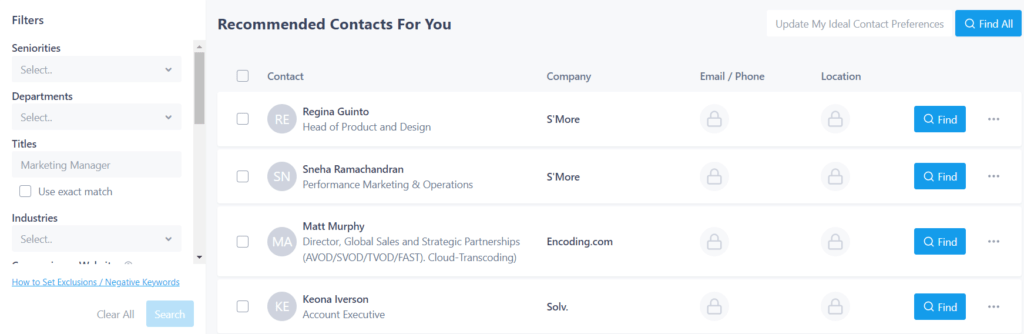
When you click on Find, you’ll see their contact details.
As you browse web pages with Seamless.ai browser extension, you can see every LinkedIn profile associated with the company’s domain.

The bulk export is especially handy, where you get details like a prospect’s LinkedIn profile and 4+ different emails, including their primary one, and the validation on other potential emails.

You can also view the company’s details, including:
- Industry
- Revenue
- Number of employees
- Location
And along with that, the company’s complete digital footprint, including:
- Social media mentions and posts
- Website audit
- Alexa score
- News
- and much more
Notable features
- Massive contact database to find any prospects you need.
- Data enrichment to validate your contact’s information.
- Job change alerts to know when the contact changes their job.
- CRM integration, among other integrations.
Pricing
Pricing starts at $99 per month for 5 users.

Similar link-building tools
💬 The bottom line
Seamless.ai is geared toward generating B2B leads, making it a favorite link-building tool.
And with its very comprehensive contact database and email verification, this is a tool you need for campaigns that scale.
4. Check My Links for broken link building opportunities
